Bullhorn WhatsApp integration: chats saved to the right candidate.
ConvoSync saves recruiters' WhatsApp chats to the matching Bullhorn candidate or contact, with a short summary and the full chat attached.

ConvoSync is a Bullhorn WhatsApp integration for capturing chats, not sending them. A Chrome extension next to WhatsApp Web matches each chat to a Bullhorn candidate or contact by phone number and saves an AI summary plus the full conversation. It works with recruiters' personal or business numbers.
How a WhatsApp chat reaches Bullhorn
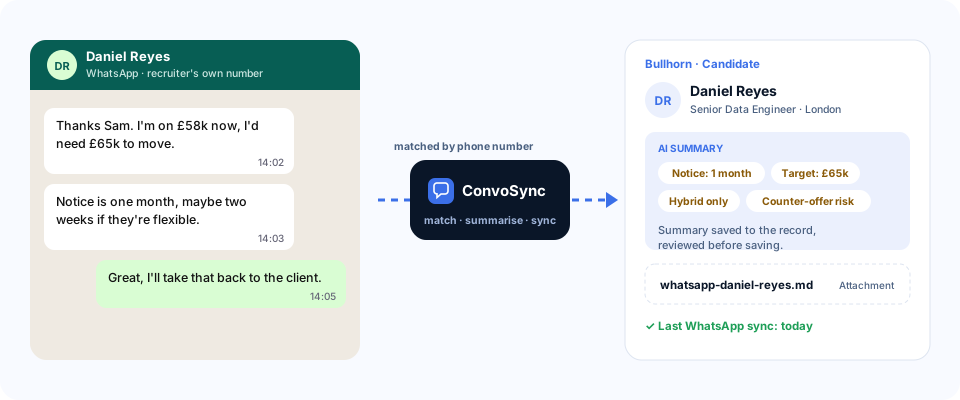
Two different jobs: messaging from Bullhorn, and capturing the chats your team already has
Bullhorn Messaging lets recruiters send WhatsApp messages from inside Bullhorn. It doesn't pick up the chats recruiters already have on their own phones. ConvoSync does.
| Bullhorn Messaging (WhatsApp) | ConvoSync | |
|---|---|---|
| Main job | Send and receive WhatsApp messages from inside Bullhorn | Save the chats recruiters already have into Bullhorn |
| Whose number | A WhatsApp Business account set up for Bullhorn Messaging | Each recruiter's existing personal or business WhatsApp |
| Outreach | Approved templates for outbound messages | Not needed: ConvoSync doesn't send anything |
| Chats on recruiters' phones | Not captured | Captured for candidates and contacts in Bullhorn |
What ConvoSync saves to Bullhorn
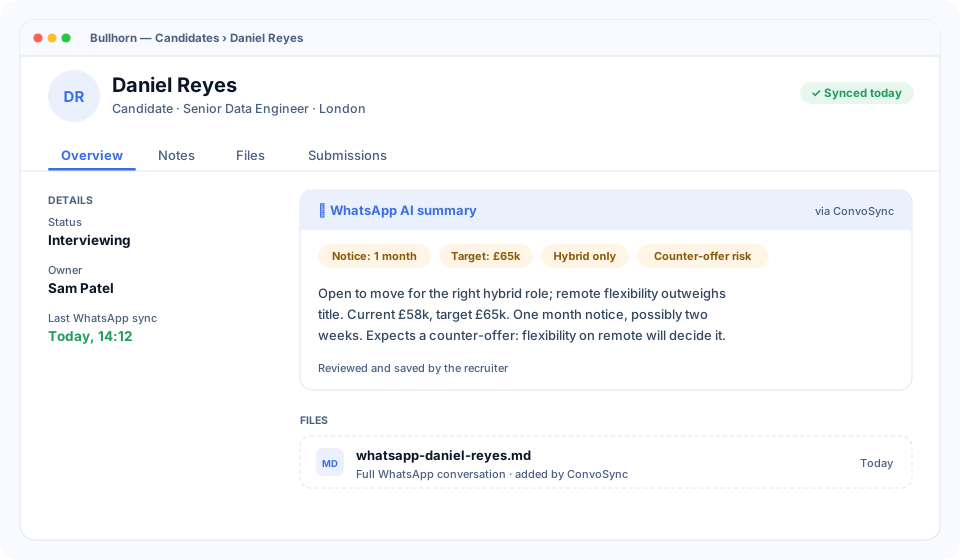
- AI summary on the record, general or tailored to recruitment: notice period, salary, must-haves, risks.
- The full conversation attached to the record as a Markdown (.md) file.
- Last sync date, so the team can see how current the record is.
Which records
- Candidates. The main use: notice periods, salary expectations, availability and motivations, kept on the profile.
- Client contacts. Hiring manager feedback and vacancy details shared on WhatsApp.
Connecting WhatsApp to Bullhorn in four steps
A standard setup usually takes about a week. Our team helps onboard your users.
Connect Bullhorn
We connect ConvoSync to your Bullhorn account with you and set up where summaries are saved.
Install the extension
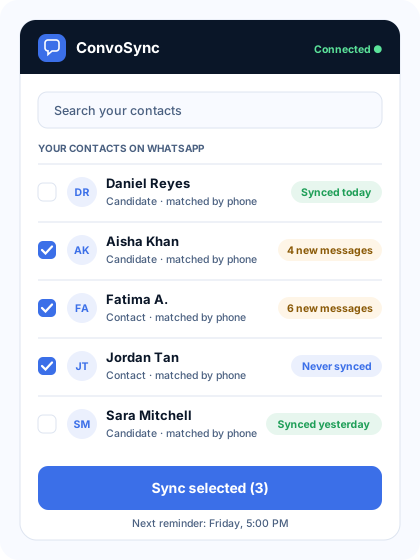
Each team member adds the ConvoSync Chrome extension and opens WhatsApp Web.
Review and sync
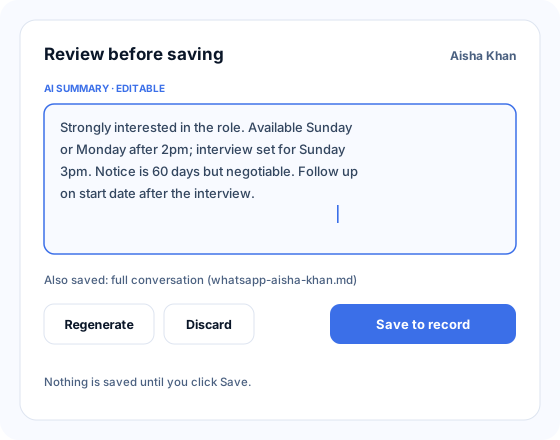
Pick contacts, read the AI summary, edit if needed, and save. Bulk sync is available.
Set reminders
Choose the days and time. Admins see who is and isn't syncing.
Where it helps Bullhorn teams most
A consultant hands in notice
Their candidate conversations are already on the Bullhorn records, so the next consultant starts from the history, not a blank profile.
Rediscovering silver medallists
Six months later, the salary, notice period and reason they dropped out are on the candidate record when a new role opens.
Hiring manager feedback
Interview feedback a client sent on WhatsApp is saved to the client contact, not lost in one recruiter's chat.
What you need
- A Bullhorn account. We connect ConvoSync to it with you during setup.
- Google Chrome on Windows or Mac, with WhatsApp Web.
- Candidates and contacts in Bullhorn with phone numbers, assigned to the recruiter.
Bullhorn WhatsApp integration: common questions
How do I add WhatsApp chat history to a candidate in Bullhorn?
With ConvoSync connected to Bullhorn, a recruiter opens WhatsApp Web and clicks sync. The chat is matched to the Bullhorn candidate by phone number and saved as an AI summary plus the full conversation as a Markdown (.md) file attached to the record.
Is ConvoSync the same as Bullhorn Messaging?
No. Bullhorn Messaging is for sending and receiving WhatsApp messages from inside Bullhorn. ConvoSync captures the conversations recruiters already have on their own WhatsApp and saves them to Bullhorn. Teams can use both.
Does it work with recruiters' personal WhatsApp numbers?
Yes. ConvoSync works with whichever personal or business WhatsApp account is linked to WhatsApp Web on the recruiter's laptop. No new number or WhatsApp Business API account is needed.
Can it save chats with client contacts and hiring managers?
Yes. ConvoSync works with both candidate and client contact records in Bullhorn, matched by phone number. Candidates are the main use.
Does it capture old WhatsApp conversations?
Yes. The first sync captures the full conversation history available in WhatsApp Web. After that, each sync adds only the new messages.
Will it read recruiters' private chats?
No. It only reads conversations with candidates and contacts in Bullhorn that are assigned to that recruiter. Chats with family, friends or anyone else are never read.
More integrations
See a chat saved to Bullhorn.
A 20-minute walkthrough with sample data. No preparation needed.
Or email [email protected] · call +91 97170 87420 · WhatsApp us