Zoho CRM WhatsApp integration: chats saved to the right contact.
ConvoSync saves your team's WhatsApp chats to the matching Zoho CRM contact, with a short summary and the full chat attached.

ConvoSync is a Zoho CRM WhatsApp integration that captures the chats reps and account managers already have on their own numbers. A Chrome extension next to WhatsApp Web matches each chat to the Zoho CRM contact by phone number and saves an AI summary plus the full conversation. No WhatsApp Business API needed.
How a WhatsApp chat reaches Zoho CRM
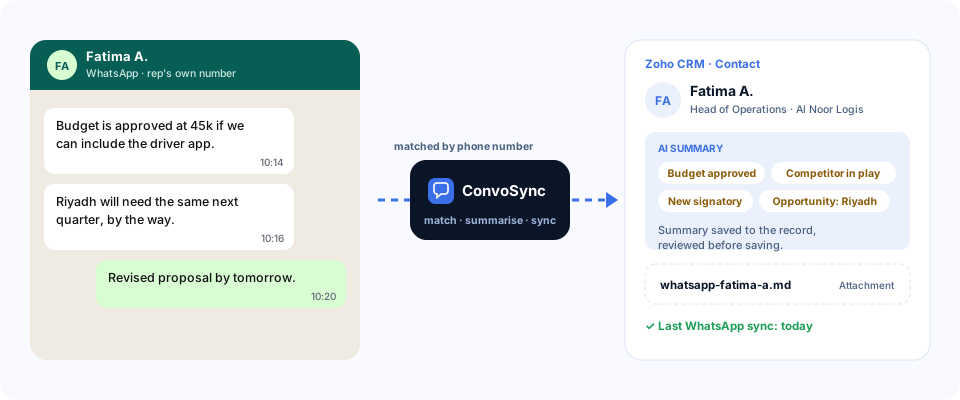
Two different jobs: messaging from Zoho CRM, and capturing the chats your team already has
Zoho CRM's own WhatsApp channel sends messages from one company number on the WhatsApp Business API. It doesn't capture what reps say on their own phones. ConvoSync does.
| Zoho CRM's WhatsApp channel | ConvoSync | |
|---|---|---|
| Main job | Send and receive WhatsApp messages inside Zoho CRM | Save the chats reps already have into Zoho CRM |
| Whose number | A WhatsApp Business API number, set up through Meta | Each rep's existing personal or business WhatsApp |
| Starting a conversation | Approved message templates | Not needed: ConvoSync doesn't send anything |
| Chats on reps' phones | Not captured | Captured for contacts in Zoho CRM |
What ConvoSync saves to Zoho CRM
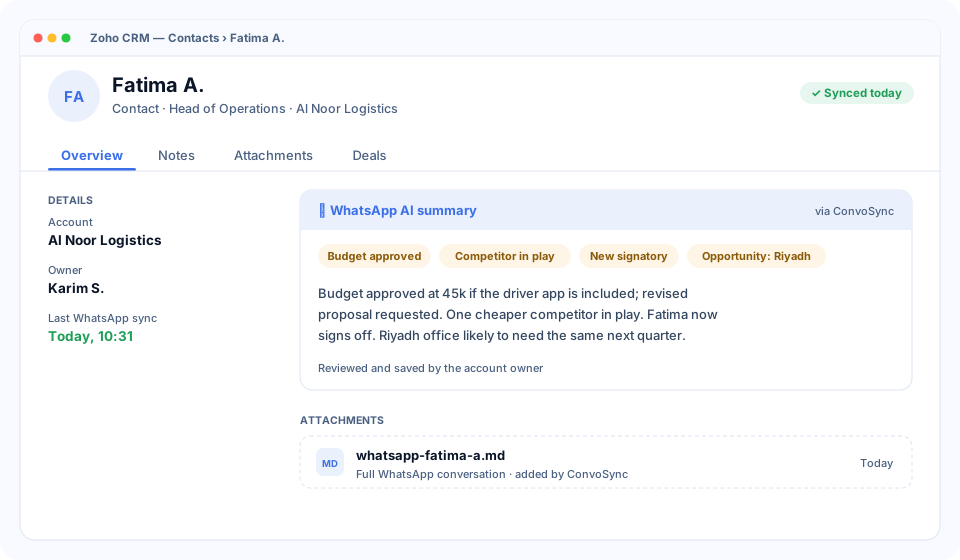
- AI summary that surfaces the opportunities hidden in the chat: budget, timing, people, risks and next steps.
- The full conversation as a Markdown (.md) file in the record's attachments.
- Last sync date, so managers can see when the record was last updated from WhatsApp.
Which records
- Contacts. The default: every synced conversation lands on the matching contact.
- Leads, deals and accounts. Extra rules can also update these, set up to fit your sales process.
Connecting WhatsApp to Zoho CRM in four steps
A standard setup usually takes about a week. Our team helps onboard your users.
Connect Zoho CRM
We connect ConvoSync to your Zoho CRM account with you and set up where summaries are saved.
Install the extension
Each team member adds the ConvoSync Chrome extension and opens WhatsApp Web.
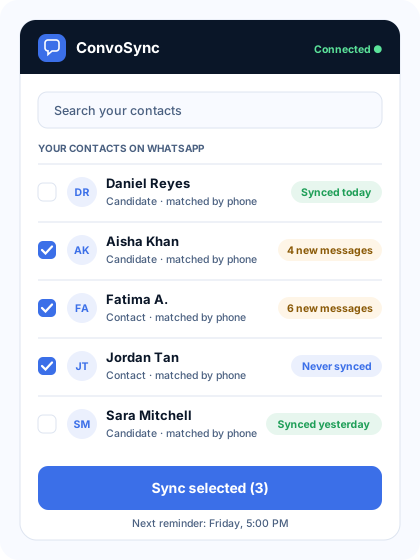
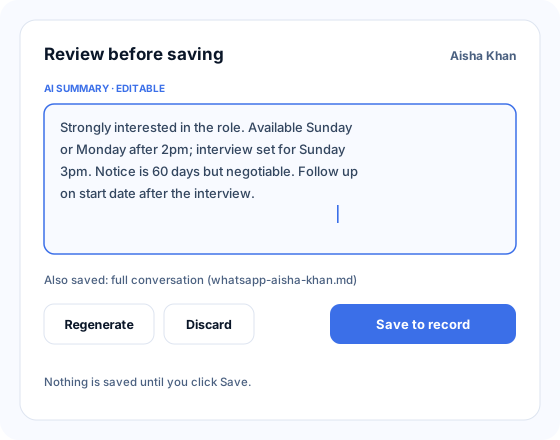
Review and sync
Pick contacts, read the AI summary, edit if needed, and save. Bulk sync is available.
Set reminders
Choose the days and time. Admins see who is and isn't syncing.
Where it helps Zoho CRM teams most
Pipeline reviews on real context
Managers read what the buyer actually said on WhatsApp, not a stage that hasn't moved in weeks.
A rep moves on
Their buyer conversations are already on the Zoho CRM contacts for whoever takes over the accounts.
Renewals and expansion
Account managers' WhatsApp hints about renewal risk or a new site are saved before they're forgotten.
What you need
- A Zoho CRM account. We connect ConvoSync to it with you during setup.
- Google Chrome on Windows or Mac, with WhatsApp Web.
- Contacts in Zoho CRM with phone numbers, assigned to the rep.
Zoho CRM WhatsApp integration: common questions
How do I log WhatsApp messages in Zoho CRM?
With ConvoSync connected to Zoho CRM, a rep opens WhatsApp Web and clicks sync. The conversation is matched to the Zoho CRM contact by phone number and saved as an AI summary plus the full chat as a Markdown (.md) attachment.
Do I need Zoho CRM's WhatsApp Business channel to use ConvoSync?
No. ConvoSync doesn't use a WhatsApp Business API number. It captures chats from your reps' existing WhatsApp accounts. If you already use Zoho CRM's WhatsApp channel for messaging, you can use both.
Does it work with reps' personal WhatsApp numbers?
Yes. ConvoSync works with whichever personal or business WhatsApp account is linked to WhatsApp Web on the rep's laptop.
Can conversations be attached to leads or deals?
By default they're saved to the contact. Extra rules can be set up so leads, deals or accounts are updated too, to fit your process.
Can it create new leads from WhatsApp chats?
Not as standard. ConvoSync captures conversations with contacts that already exist in Zoho CRM. Creating leads or deals automatically can be built as a custom addition.
Does ConvoSync send WhatsApp messages from Zoho CRM?
No. ConvoSync captures and archives conversations. It doesn't send messages, templates or campaigns.
More integrations
See a chat saved to Zoho CRM.
A 20-minute walkthrough with sample data. No preparation needed.
Or email [email protected] · call +91 97170 87420 · WhatsApp us